
Anova Culinary
Anova Applied Electronics, LLCFood & Drink
3.26.24K Reviews
- Version
- 3.6.6
- Installs
- 1.00M
- Age Rating
- Everyone
Screenshots
Our Review of Anova Culinary
 Analysis by Appyee
Alright, fellow food enthusiasts, let's dive into the world of precision cooking with the Anova Culinary app, the ultimate companion for sous vide cooking. Whether you're a seasoned chef or just a home cook looking to spice things up, this app promises to elevate your kitchen game.
What to expect from a sous vide companion
I’d describe this as a cooking companion built around sous vide rather than a general meal planner or a broad collection of kitchen tools. Its recipes and guides are aimed at helping you make sense of this method, and the phone controls are most useful when you have an Anova Precision Cooker to pair with the app. If you’re curious about cooking food gently in a controlled water bath, that focus gives you a more direct starting point than searching through unrelated recipe ideas.
The app is free to download, though it offers in-app purchases priced from $1.99 to $9.99 per item. It is made by Anova Applied Electronics, Inc., has an Everyone age rating, and has been available since April 28, 2015. Its current version is 3.5.13, and it requires Android 7.0 or later. It has passed 1 million installs, with an average rating of 3.3 from around 28,000 ratings and roughly 6,200 written reviews. Those numbers suggest a well-established product with mixed experiences, so I’d treat it as a useful kitchen tool to try rather than assume it will suit every cook.
The first thing to keep in mind is that the app is not a substitute for the physical cooker. It can make the process easier to follow and, when paired, give you phone-based control, but you still need the cooking equipment and a suitable vessel for the water bath. If you don’t own an Anova cooker, the recipe guidance can still be relevant, but the remote-control appeal is less central. That distinction matters before you plan dinner around a feature that depends on pairing.
First Impressions
When I first downloaded the Anova Culinary app, I was struck by its sleek and intuitive design. The interface is user-friendly, with everything neatly organized to ensure you spend more time cooking and less time fiddling with your phone. It’s like having a culinary assistant right in your pocket.
Getting Started
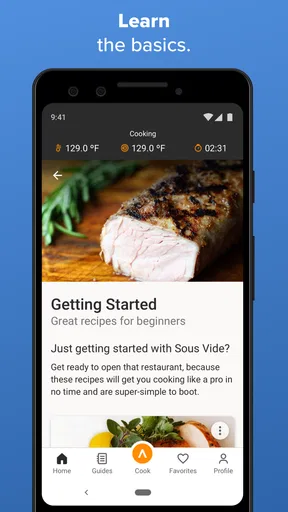
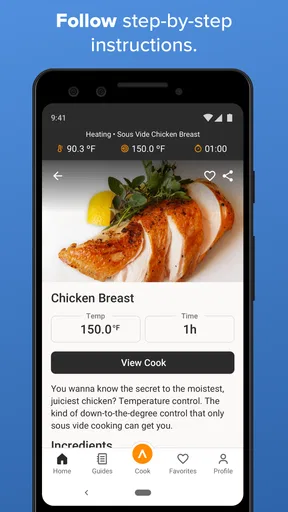
Setting up the app was a breeze. Once you've paired it with your Anova Precision Cooker, you're ready to explore a world of sous vide recipes. The app guides you through the process with step-by-step instructions, making it incredibly easy to follow along. It’s perfect for beginners who might be intimidated by the idea of sous vide cooking.
For a first session, I’d keep the goal modest: choose one recipe, read all its steps before starting, and gather the ingredients and equipment first. Sous vide often involves a longer cooking window than a quick stovetop meal, so deciding on dinner at the last minute can be frustrating even when the actual setup is straightforward. A little preparation also lets you notice whether the recipe assumes a particular cut or preparation, instead of discovering that halfway through.
Pairing is worth checking before you begin cooking, not while a pot is already heating. If you want phone control, confirm that the cooker appears connected and that you can access its controls before relying on it for a meal. If the connection does not behave as expected, you can still use the recipe as a guide and handle the cooking directly on the cooker. I find it reassuring to have that fallback rather than treating the app connection as essential to every step.
Recipe Selection
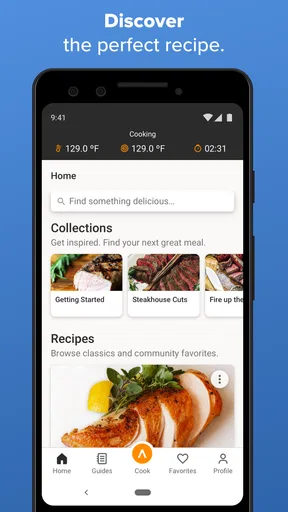
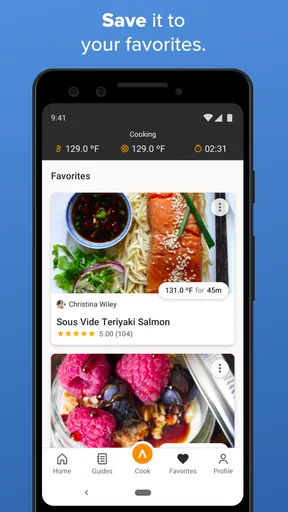
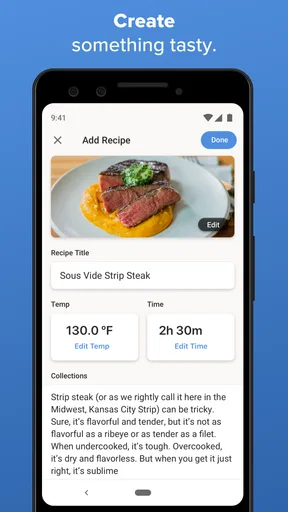
This is where the app truly shines. There’s a plethora of recipes to choose from, ranging from juicy steaks to perfectly poached eggs. Each recipe comes with detailed instructions, including temperature and time settings. You can even save your favorite recipes for easy access later.
What I love about the recipe section is the diversity. You can find dishes for every occasion and dietary preference. Whether you’re in the mood for something classic or want to try a new twist on an old favorite, the app’s got you covered.
A useful habit is to treat the recipe as a starting point, then check that it matches what you actually bought. Thickness, portion size, and whether food is fresh or frozen can affect how you plan a cook, so I wouldn’t blindly reuse a saved setting for a noticeably different piece of food. Saving a recipe is handy for repeating a result, but keeping a brief note about what worked for your own ingredients can make that saved favorite more useful the next time.
For a weekday example, I might choose a recipe earlier in the day, check that I have the right ingredients, then start the water bath before the evening rush. While the food cooks, I can prepare a side dish or set the table rather than stand over a pan. The trade-off is that sous vide rewards planning; it is not my first choice when I need a meal on the table in a few minutes. For speed, a skillet, oven, or microwave is often the more practical alternative.
Cooking with Precision
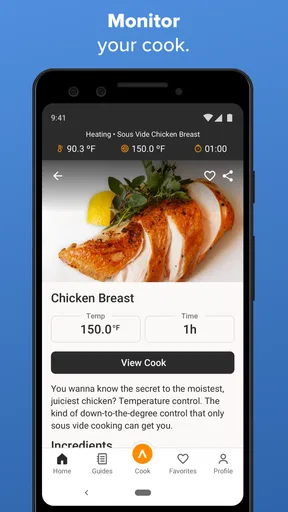
The app allows you to control your Anova Precision Cooker directly from your phone. This means you can adjust the temperature and cooking time without being tied to the kitchen. It’s like having a remote control for your cooking, letting you multitask without stress.
The precision aspect is a game-changer. You can achieve restaurant-quality results at home with minimal effort. Simply set your desired temperature, and the app takes care of the rest. It’s almost like magic—perfectly cooked meals every time.
I’d temper that last promise in everyday use: precise temperature control helps make results more consistent, but it cannot rescue poor ingredient quality, careless handling, or a recipe that does not suit the food in front of you. I also wouldn’t confuse remote adjustment with forgetting about dinner altogether. You still need to follow the recipe, handle food safely, and finish the dish in whatever way the instructions call for. The app makes the controlled-cooking part more convenient; it doesn’t remove the cook’s judgement.
Compared with conventional recipe apps, Anova’s strongest case is the close link between instructions and sous vide cooking, especially when you have a compatible cooker. A general recipe app offers broader meal inspiration and may be more useful if you mostly bake, sauté, or want help planning a whole week of meals. A cookbook can be simpler when you prefer paper instructions and do not want a phone beside the counter. I’d choose Anova when I want guidance for this particular technique, not as my only source for every kind of cooking.
Common points of confusion
One practical question is whether the app makes sense without the cooker. It can still be useful for browsing sous vide recipes and guides, but the direct-control feature depends on pairing with an Anova Precision Cooker. If you are only researching the technique, you can explore the guidance first; if your main reason for installing it is controlling a device you do not own, it is unlikely to meet that expectation.
Another point to check is the purchase model. The app is free, while some in-app items cost between $1.99 and $9.99. I’d browse what is available before assuming every piece of content is included, especially if you are trying the method for the first time and want to keep spending predictable. You can start by seeing whether the recipes and guides you need are accessible to you, then decide whether any paid item is worth it for your own cooking routine.
The average rating of 3.3 across around 28,000 ratings is a reason to approach it with balanced expectations, not a verdict on how it will work in your kitchen. Experiences can differ depending on whether someone wants recipes, device control, or a broader food app. For me, the fairest test is practical: can I find a relevant recipe, understand the steps, and use the controls I need without turning dinner into a troubleshooting session?
Community and Support
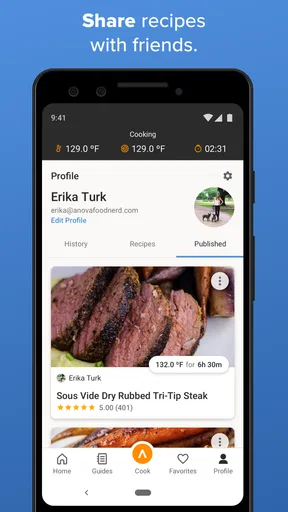
One of the standout features is the community aspect. You can connect with other users, share your creations, and gain inspiration from others. It’s a vibrant community of food lovers, all eager to share tips and tricks.
Plus, the app provides excellent support. If you ever run into issues, you can find a wealth of resources and FAQs to help troubleshoot. It’s reassuring to know that help is just a tap away.
I’d use community ideas as inspiration, but I would still check the actual recipe instructions before copying someone else’s approach. A photo can show how a dish looks, while the details that affect timing and preparation may be more important to repeating it. For a beginner, that distinction is helpful: browse for ideas, then lean on clear instructions for the first attempt rather than improvising several changes at once.
Who will get the most from it
I think the best fit is someone who already owns an Anova Precision Cooker, wants to try sous vide without piecing together instructions from scattered sources, and enjoys repeating recipes once they work. It is also a sensible option for a curious beginner who is willing to plan ahead and learn one recipe at a time. The guided format can make the unfamiliar method feel more approachable, while saving favorites gives regular users a convenient way back to dishes they like.
I’d skip it, or at least keep expectations modest, if you want a general-purpose recipe planner, dislike cooking with a phone nearby, or rarely have time to plan meals ahead. It is also not the right fix if you expect an app alone to produce a complete dinner or to replace the physical cooker. In those cases, a broad cooking app, a reliable cookbook, or a quick conventional recipe may fit your habits better.
Final Thoughts
In conclusion, the Anova Culinary app is a must-have for anyone interested in sous vide cooking. Its user-friendly design, extensive recipe library, and precise cooking controls make it an invaluable tool in the kitchen. Whether you’re a novice or a seasoned pro, this app will help you achieve culinary perfection with ease.
So, if you’re ready to up your cooking game and impress your friends and family with perfectly cooked dishes, give the Anova Culinary app a try. It’s not just an app; it’s a culinary revolution at your fingertips.
My more measured recommendation is to start with one dish you genuinely want to eat, rather than treating the app as a promise of instant mastery. Check the recipe in advance, make sure your cooker is paired if you plan to use phone controls, and leave yourself enough time for the method. If that first result suits your routine, the saved recipes and focused guidance can make the next attempt feel much easier. If it feels too slow or too tied to specific equipment, there is no shame in returning to the cooking methods you already enjoy.
Verdict
Strengths of Anova Culinary
- User-friendly interface simplifies cooking.
- Extensive recipe library for inspiration.
- Precise temperature control for perfect results.
- Seamless Bluetooth and Wi-Fi connectivity.
- App updates with new features frequently.
Limitations of Anova Culinary
- Requires external device for full functionality.
- Limited offline capabilities.
- Initial setup can be confusing for beginners.
- App notifications can be overwhelming.
- Some recipes lack detailed instructions.
Other Releases by Anova Applied Electronics, LLC
View All
Anova Oven
Food & Drink3.2
Similar Picks in This Category
View All
Rappi: Food Delivery, Grocery
Rappi, Inc - Delivery3.5

McDonald’s: Cupons e Delivery
Arcos Dorados4.3

Swiggy: Food Instamart Dineout
Swiggy4.7

Blinkit: Groceries & more
Blinkit4.8

foodpanda: food & groceries
Foodpanda GmbH a subsidiary of Delivery Hero SE4.0

Zomato: Food Delivery & Dining
Zomato4.7
Frequently Asked Questions
What is the Anova Culinary app used for?
The Anova Culinary app is designed to complement the Anova Precision Cooker, allowing users to cook sous vide meals with precision. It offers a user-friendly interface to control cooking times and temperatures, browse recipes, and even monitor cooking progress remotely via Wi-Fi or Bluetooth connectivity.
Is the Anova Culinary app compatible with all smartphones?
The Anova Culinary app is compatible with both Android and iOS devices. It requires Android 5.0 or later and iOS 12.0 or later. Ensure your smartphone meets these requirements for optimal performance. Additionally, check for regular updates to maintain compatibility with your device.
Do I need to purchase any additional equipment to use the app?
Yes, while the app itself is free, you will need the Anova Precision Cooker to fully utilize the app's features. The app is designed to control this specific sous vide device, providing a seamless cooking experience with precise temperature and time settings.
Are there any costs associated with using the Anova Culinary app?
The Anova Culinary app is free to download and use. However, users must purchase the Anova Precision Cooker to access full functionality. The app offers an extensive range of free recipes and guides, making it a cost-effective tool for enhancing your sous vide cooking skills.
Can the Anova Culinary app be used offline?
While the Anova Culinary app offers some offline capabilities, such as viewing saved recipes, full functionality requires an internet connection. Remote cooking, real-time monitoring, and downloading new recipes all require Wi-Fi or mobile data access to ensure seamless operation and updates.
